Saturday, March 12, 2016

ADF: Control rows which you want to commit

Problem Description: Let say you have a table in ADF and you want to make sure that even if user edits or create certain rows, they should not get committed but other rows should get committed. Generally when we do commit in adf all rows gets committed together but our requirement is to chose which records should get committed and which one should not.


In this blog I have a hypothetical usecase that all employees rows having firstname=Sanjeev should not get inserted. Its just frozen and no one should be able to modify them.
In ideal case we would like to throw error to end user and let him/her know why certain row can not be committed, but then real world is not ideal and there are chances that we don't want to show error but we silently want to make sure that certain rows (in our example where firstname=Sanjeev) are not getting inserted.

Solution: Its prettey simple. Use doDML method of EOImpl and do not call super.doDML for certain rows. This is doDML operation, which is going to fire actual insert/update/delete operation. If we don't call superclasses doDML operation that those operations will not happen for the row.

Step 1: Create EO/VO/AM based on employee table.

Step 2: Generate EOImpl and override doDML operation as shown below
    protected void doDML(int operation, TransactionEvent e) {
        if(operation == DML_INSERT && "Sanjeev".equals(this.getFirstName())){
            System.out.println("Do not commit employee rows having first name = sanjeev");
        }
        else{
            super.doDML(operation, e);
        }
       
    }

Step 3: Run AM and tester in bc4j tester and show VO in tabular format

a. Create two new rows one having FirstName=Sanjeev and other FirstName=Sanjeev1
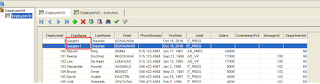
 

b. Commit transaction

c. Requery vo

You see there is only one row has got committed.


Launch Popup while loading the page

Problem Description: In this blog I am trying to explain how we can launch a popup while loading the page. Generally we launch popup as an event of some activity (button click, link click, input change etc). What if we need to launch a popup while user is launching the page first time? There are different usecase for this.
a. You may want to provide a change password popup to user when he access system first time.
b. You may want to ask user to 'read and acknowledge' agreement terms before accessing a page.


Solution: There could be multiple ways to do it. I am going to show two ways.
First which works if you have a page and your UI components are directly on page.
Second if you have bounded task-flow and your popup is on a jsff of bounded task-flow. Task-flow is appearing as a region on main page.


First Approach: When you have your UI components (popup) on a jspx page directly.

Step 1: Create your page (say main.jspx) and bean (say MainBean.java) and register it in backingbeanscope.

Step 2: Create popup on your main.jspx

Step 3: Bind popup with bean

Step 4: Implement BeforePhase for your page: For this you need to select f:view tag in your page and set(or create) bean method that you want to execute in beforePhase property.

Step 5: Implement launchMyPopup method as shown below
    public void launchMyPopup(PhaseEvent phaseEvent) {
        // Add event code here...
        if(this.getChangePwdPopup() != null){
            Map viewScope = (Map)ADFUtil.evaluateEL("#{viewScope}");
            String isPgInitialized = (String)viewScope.get("pIsPgInitialized");
            if(isPgInitialized == null){

               //You may want to have additional complex business logic of page initialization. Do it here.
                    this.getChangePwdPopup().show(new RichPopup.PopupHints());
                viewScope.put("pIsPgInitialized", "Y");
                
            }
            
        }
        
    }

Above code is going to get executed while page is loading. It is actually going to get executed multiple times while page is getting loaded. (For every phase once).
Out logic is we are going to do page initialization activities (in this case launching popup) only once and immediately we will set a viewScope parameter. To avoid unnecessarily running page initialization code again and again in every phase, we are going to check if viewScope parameter is already set. If its there we will not execute our code. Viewscope checking will save us if user is doing some activity like button click etc on page, still our code is not going to execute as viewScope will still have the variable.

Step 6: Run page and verify.


Now coming to next approach. If your popup is on a jsff, which is used in a bounded-task-flow. You have dropped bounded task-flow as a region on main page.

In this situation, we don't have beforePhase property in jsff file component. One easy solution that I can figure out is having a hidden (visible=false) outputtext on page. Bind it on bean and write your code inside getter method.


Step 1: Have your task-flow (say MyTestFlow), bean (MainFGBean registered in task-flow at backingbeanscope), Fragment (say MyTestPG.jsff).

Step 2: Create popup in MyTestPG.jsff and bind it with bean

Step 3. Have one hidden (visible=false) outputtext in jsff file. It must be at very bottom of jsff. That will make sure that getter of this run at last. By the time all UI component would have been already bound with bean.

Step 4. Have below code in your bean

public class MainFGBean {
    private RichPopup changePwdPopup;
    private RichOutputText pageInitText;

    public void setChangePwdPopup(RichPopup changePwdPopup) {
        this.changePwdPopup = changePwdPopup;
    }

    public RichPopup getChangePwdPopup() {
        return changePwdPopup;
    }
    public void setPageInitText(RichOutputText pageInitText) {
        this.pageInitText = pageInitText;
    }

    public RichOutputText getPageInitText() {
        if(this.getChangePwdPopup() != null){
            Map viewScope = (Map)ADFUtil.evaluateEL("#{viewScope}");
            String isPgInitialized = (String)viewScope.get("pIsPgInitialized");
            if(isPgInitialized == null){

                //You may want to have additional complex business logic of page initialization. Do it here.
                this.getChangePwdPopup().show(new RichPopup.PopupHints());
                viewScope.put("pIsPgInitialized", "Y");
                
            }
            
        }
        return pageInitText;
    }
}

NOTE: How getPageInitText is launching popup. Its trying to initialize page UI components. By the time this getter runs popup getter/setter is already done and popup is already associated with bean. That is because you have added outputtext at the bottom of jsff.

Step 5: Run and test. 


NOTE: Above mentioned approaches are not limited to showing poup on page-load but it is helpful to play around with UI components on page load. For example
a. You may want to make your complete page read only for certain condition.
b. You may want to dynamically make one column form to two column based on some condition.

To sumup you want to play with UI components while page is getting loaded. 

Monday, February 15, 2016

Run Groovy from Java

Why do we want to mix Groovy with Java:
One common requirement in java is to keep core logic in groovy and then evaluate it at runtime. This gives a flexibility as groovy can be referred from xml file, property file or database. That way customer can change groovy anytime and without deployment java code can start working with new groovy expression.

One common example could be calculating salary components. We definitely want to give customer a flexibility to write his own logic to determine salary components. We don't want to hard code that logic in java code. In such cases we can store groovy expression in database table and read it at runtime and evaluate it from java. End user can change groovy expressions anytime in database.

Basic requirement from groovy to java integration would be
a. Somehow we should be able to pass java variables to groovy code. These are called environment variables.
b. Somehow we should be able to parse and run groovy from java. We have Groovy apis for that.
c. Somehow values calculated by groovy should be passed back to java.

Below code show how we can do it.

import groovy.lang.Binding;
import groovy.lang.GroovyShell;
import groovy.lang.Script;

import java.util.HashMap;
import java.util.Map;


public class GroovyUtil {
    public GroovyUtil() {
        super();
    }
   
    public static Map evaluateGroovy(Map paramMap,String scriptText){
       
       System.out.println("Evaluating groovy: " + scriptText);     
        System.out.println("Input Map: " + paramMap);

       //Environment variables passed to groovy using Binding.
        Binding binding = new Binding(paramMap);
        GroovyShell shell = new GroovyShell();       
        Script script = shell.parse(scriptText);
        script.setBinding(binding);
        script.run();

        //bindings.getVariables() returns all variables of groovy including input and other local variables
        System.out.println("Output Map: " + binding.getVariables());      
        return binding.getVariables();
       
    }
   
    public static void main(String[] args){
        String scriptText = "println('Sctipt execution Started');\n" +
        "    sum = a + b;\n" +
        "    println('script finished');";
       
        Map inputMap = new HashMap();
        inputMap.put("a",10);
        inputMap.put("b",20);
        Map outputMap = evaluateGroovy(inputMap,scriptText);
        System.out.println(outputMap);
    }
}


Output looks like
Evaluating groovy: println('Sctipt execution Started');
    sum = a + b;
    println('script finished');
Input Map: {b=20, a=10}
Sctipt execution Started
script finished
Output Map: {b=20, a=10, sum=30}
{b=20, a=10, sum=30}


For such kind of code there must be an understanding between groovy and java code about input and output variable names.

Sunday, February 14, 2016

Taleo: Installing Taleo (TCC) Client

This blog is first in my upcoming blogs of Taleo (TCC). In this I would like to show how we can install Taleo Client TCC.


2. Sign in / Register. (OTN SSO username/password will be used)  
3. Select Product "Oracle Taleo Plateform Cloud Service - Connect" and Plateform Window-32

    Select Continue
4. Read and Accept ‘Terms and Conditions’

5. Download TCC Application Datamodel and TCC Application Installer for windows

6. Once downloaded unzip both zip files. They both contains an exe file each.

7. Install ‘Taleo Connect Client Application Data Model (15.1.0.3) for Microsoft Windows.exe’ first. NOTE: its installation location. It will be required in second installation.

8. Install ‘Taleo Connect Client Application Installer (15.1.0.11) for Microsoft Windows.exe’. Provide pip location as the location of where you installed datamodel.


9. Launch Taleo Client.
10. If you are launching first time, you need to pint Taleo server. Select Product and provide, Host Port (generally 443 for https), username/password


Tuesday, February 9, 2016

ADF 12c: Debugging Groovy

Oracle has provided a new feature in 12.1.3 to debug a groovy code. Feature is very much required and very simple to use.

Ideally you just need to select Groovy Line at design time and then run debugger. Jdeveloper will stop while running that line of groovy and you will be able to check values of local variables in Jdeveloper data window.

One thing that you need to notice is Dont use source mode to select groovy expression. Use Declarative mode (overview tab). In below diagram I am showing how EO validation is selected.

As a result when you run debugger you will see application stops when groovy is getting executed and you can go line by line from there, while viewing local variables in data window of debugger.


Even you get handle of this variable, which can be used to view other values.


Simple but very very useful feature in ADF. So no more println(varname)